
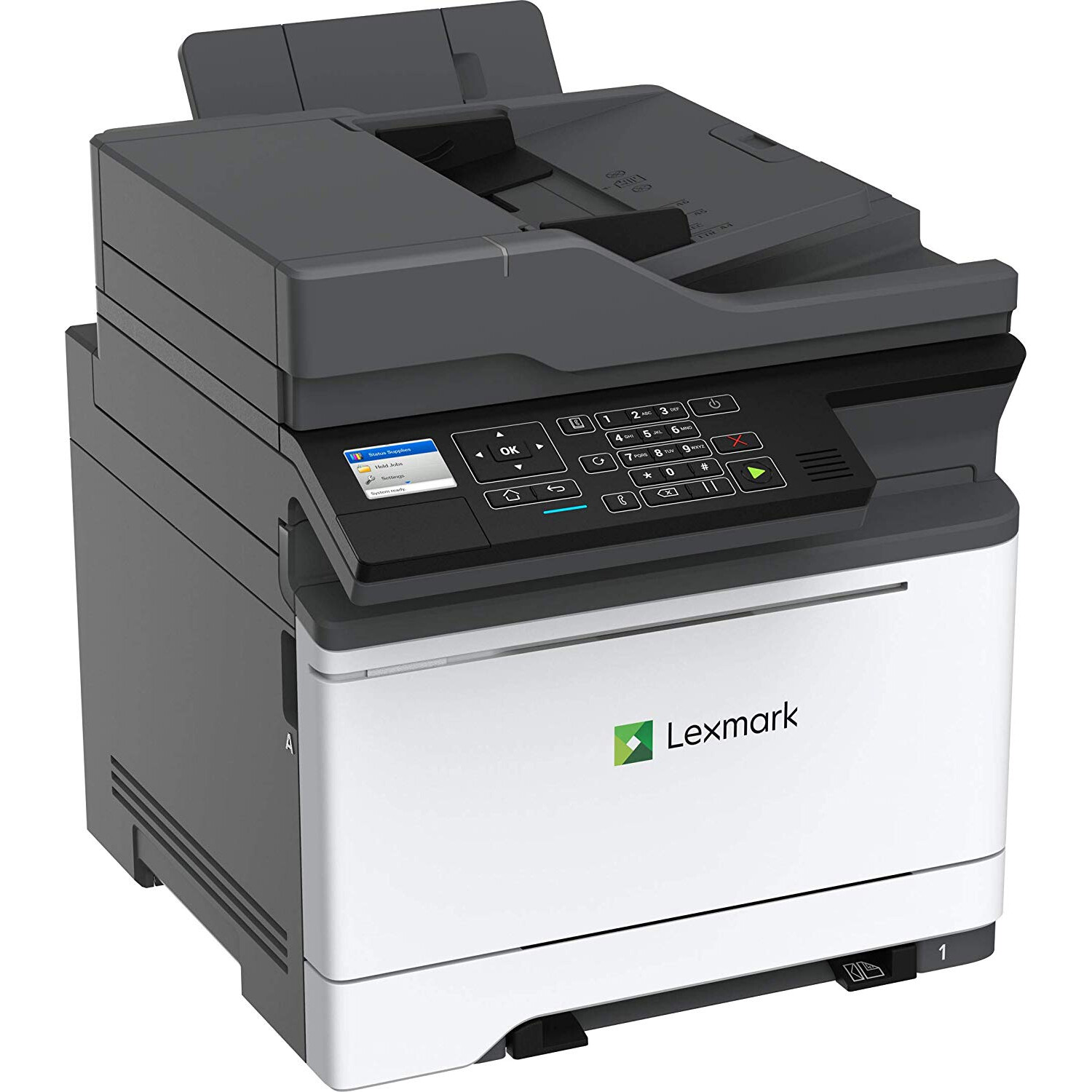
Lexmark MC2425adw Multifunction Color Printer with Duplex Printing and Wireless Capabilities (42CC430)
اكتب تقييم
KD‎ 429.00

Lexmark MC2425adw Multifunction Color Printer with Duplex Printing and Wireless Capabilities (42CC430)

اكتب تقييم
B07FDJQ4JR
Target is a general merchandise retailer with stores in all 50 states and the District...

المدينة: KW, New York

Delivery
Pickup at your own expense
Tomorrow from 09:00 to 20:00, Store location
Free
Payment options
Apple Pay Google Pay Mastercard Visa
Cash, bank card, credit/installment payments, cashless payment for legal entities
Warranty and returns
Exchange/return of products of proper quality within 14 days Official manufacturer's warranty: 12 months
Features
Connectivity Technology
Wi-Fi
Item Dimensions
23 x 22 x 22 in
Item Weight
59 lbs
Operating System
  • Windows
Printer Output
Color
Printer Technology
Laser
Description
This fits your .
Make sure this fits by entering your model number. The Lexmark MC2425adw packs reliable, productive and secure color multifunction performance into a small-footprint package with output up to 25 pages per minute Front USB port allows walk-up printing from popular file formats without a computer It reliably handles diverse media types and sizes and comes equipped with both built-in Wi-Fi and tools to help you minimize toner consumption Lexmark full-spectrum security architecture helps keep your information safe-in the document, on the device and over the network Recommended monthly page volume: 800 - 6,500 pages
Reviews
3.8
التقييمات: 20
5 نجمة
50%
4 نجمة
20%
3 نجمة
5%
2 نجمة
10%
1 نجوم
15%
William Poindexter
5
Had a few issues installing the software, mainly for scanning. But works great!
Susan Wehba
1
We bought two of these and are having trouble with both of them with paper jams. We need service on them. Will the warranty pay for service. And who do I call.
J.C.
5
I love this printer. It is easy to set up, including connecting it to my WiFi network. To connect, I could do it from the machine itself without loading software and hardwiring it to a computer to start. The machine is fast to respond and to print, and produced really nice text and pictures, including auto duplexing. I compared the test to an HP laser printer (B&W that one) and the test from the Lexmark is finer and less course. There is a manual feed slot at the bottom of the printer to use for envelopes, or other custom paper if desired. I had to play with my envelope layout, but now it is easy to print envelopes too, even from my phone, since the printer has AirPrint. . I tried printing a photo and it looked great on letter paper. Compared to one printed professionally (photo paper), it was a bit more red and less nuanced, but the Lexmark certainly did a better job than I had expected. I havent tried scanning yet, but the copy function, both doc feeder and flat bed, produce nice copies. Note the size of the printer though. The footprint is on the large side.
Jason
5
Super easy to setup! Instructions for removing certain plastic pieces used for shipping were easy to follow. The instructions provided pictures for each step. Had no problems setting up on my 2.4Ghz password protected WiFi network. I was able to setup without using the included CD or the mobile app they recommend. I downloaded drivers from Lexmark’s website. I have them installed on a Debian Linux distribution, an OpenMediaVault (CUPS) distribution, and on a Windows 7 virtual machine. Each method I got working first try w/o any software bloat. Very happy with setup. The physical size is pretty large…. Compared to my Canon MF4890dw.. (see pic). I assume a lot of the increase in size is due to it being a color laser and needing multiple toner cartridges. I am impressed with the build quality of the Lexmark, each tray, slider, handle, etc… are all pretty thick and rigid plastic Print quality meets expectations… hard to describe in words, but perfect for all document type of printing. Don’t expect photocenter quality prints or anything. Scanning quality is superb… and I haven’t even used the highest quality setting yet. 200 DPI is providing excellent results, both grayscale and color. I’ve had some problems scanning in very thin paper into the document feeder, it wants to grab multiple pages at once. I have not had any problem scanning in standard weight paper through the feeder. Has a nice feature when you initiate a scan from a PC, there is an option to either scan immediately, or wait until you select a menu option from the printer. Good feature if the printer is not immediately next to you. Overall, highly recommended this printer. So far the only problem was scanning in the thin paper through the feeder, but I don’t really blame the printer as I even had problems separating the paper with my own hands.
Fbx_Steve
5
The MC2425adw is a great choice for a small office, home, or a workgroup. It feels very sturdy and well-made and has an abundance of features. This all-in-one prints at up to 25ppm, and is rated for a monthly print volume of up to 6,500 pages, so it should be up to the demands of most small offices. In testing, it reached (or at least came pretty close) to the 25ppm. I had no desire to burn through 15 or so reams of paper though, so I cant vouch for the monthly volume rating. Print quality was outstanding and it presented no problems using AirPrint from an iPhone or iPad. Setup was a breeze (with Macs, anyway; we dont have any Windows PCs), both wireless and using Ethernet. The instructions are clear and relatively concise. The Macs just found the printer and automatically installed the driver. If you have any experience setting up printers, this will be non-event. Even if you are a novice, you should be able to follow the instructions without much trouble. There might be some benefit to downloading the latest and greatest driver from the Lexmark website, but in my experience, the one Apple has worked just fine. The MC2425adw prints its first page quickly, too, usually spitting out the first page 12-14 seconds after hitting, "print," not bad for a consumer-oriented color printer. While great as a home or small-office machine, it has a couple of features that make it very comelling for office use. The first is the ability to print securely. If you select this option in the print job dialog, your job wont print until you go to the printer and enter a PIN you selected when printing. This is very useful to ensure that sensivive documents dont print until you are physically at the printer waiting for them. This is a nice feature in any office, and indispensable in confidential environments such as medical and legal offices. The second is the ability to add an additional, 650-page capacity, duo input tray. From the description, this optional tray is a 550-page additonal input tray + a 100-page multi-purpose feeder. I dont have this tray, but it looks to be very useful if you regularly print from a variety of page types/sizes. The built-in tray holds 250 sheets, plus there is the usual multi-purpose feeder. The addition of an extra input tray can either give you access to an additional paper size/type, or just add extra capacity of a single size so you dont have to refill as often. Having the ability to load 800+ sheets of paper at once would be great in an office with a heavy print volume. There are a couple of things that are less than ideal, however. The first is this cryptic note in the "Specs" section on the Lexmark website: "Product functions only with replacement cartridges designed for use in a specific geographical region." This appears to mean that replacement cartridges are locked to a specific region, sort of like DVDs; Ive personally never heard of this and am just speculating. That may or may not be an issue, but is something you should be aware of. The second is that, while the printer is well-suited for a moderate to heavy burden of office printing, the scanner and copier are less so if you are scanning or copying duplex documents. It scans duplex, to be sure. However, it does this by way of RADF (Reversing Automatic Document Feeder). This means that it scans one side of the page, ejects that page not quite all the way, then re-feeds it to scan the other side. Essentially, it takes twice as long to scan a 2-sided document as it does a single-sided one. The ideal scanners and copiers have true Duplex Automatic Document Feeders (DADF), with two scanning elements so that both sides of the page are scanned during a single pass. This is not an issue unless you have a heavy scanning or copying volume, AND a great percentage of that volume consists of documents printed on both sides. The ADF holds 50 pages. The all-in-one also sends and receives faxes, but I only have a VOIP landline, so I couldnt test any fax functions. This machine, like literally every other one I have ever owned or tested (which is 7 or so over the last 10 years), just doesnt work with a VOIP line for some reason. The price of this printer is quite reasonable for the quality and capabilities you get. Overall, this is a great all-in-one. I would have no hesitation making this my primary machine in either my office or home.
Tom
5
I have this printer alongside a comparable HP, model MFPM477fdw and I can say that running them side by side, the color output is indistinguishable. The Lexmark is quite a bit larger in size. The Lexmark cartridges are different than your typical HP and cost a bit more. My local toner guy says he can refill them so Im not concerned. I cant comment on the yield as Im still on the starter cartridges that were included. The Lexmark has all the features you come to expect in a desktop color laser these days. You can insert a USB drive and print directly from the divide without computer intervention. Its easy to set up and put into service. I like the fact that it has more actual buttons instead of a 100% touch screen like the HP. This is a robust small office printer that will handle your printing requirements at an attractive price. If you are shopping for a multi function color laser, this is worth a hard look.
Aaron Martin
5
Ive owned a laser printer for over a year now, and have to say I will never go back to ink. I went through a variety of printer brands and models, and all of them lasted about a year before performance issues began to creep up. Then at around the two year mark they would just fail completely (mostly ugly horizontal streaks that I couldnt calibrate away). That alone was worth switching, but I also hated being constantly told to buy more ink when I had plenty (my HP would go months printing before it "actually" ran out), and also the monthly calibration/cleaning cycles. So far with my laser printer: zero hassle. Now for this model exactly: This printer was intimidating to set up at first, but after a few Google searches was able to finish. Once done, I was able to print, scan, and copy with no issues. Quality of printing is fantastic. So far very pleased, but will be returning to adjust score in the future if anything should crop up.
Bonnie Brody
4
The physical set up was easy - pretty much on-par with the Epson Multifunction Inkjet that it is replacing. I have it set up on WiFi for now, and expect to directly plug it in to Ethernet when I move it (WiFi was the more complex set-up, and it wasnt a problem). Full color double-sided prints on legal sized paper came out sharp and clean! Setting up the scan-to-email functions do appear a little harder, but I am not sure if that is the printer or Google. I havent gotten that quite working yet. The duplex sheet-feeder works nicely. It seems to be able to handle a mix of paper types, though I did note that it cant handle duplex on 80-lb paper, and when there is a mix of 20-lb, 40-lb, and 60-lb paper, it seems to jam on duplexing the 60-lb paper, otherwise, seems to work fine. Overall, it seems to work wonderfully!
Sotto voce
5
First, it suits my needs for a task group shared printer. Keep the box and packing if your requirements include shipping off-site. Install is typical which is to say it takes about an hour to get the printer and linked computers set-up. Wireless connectivity is a snap. The full fidelity color laser output on a standard stock paper is primo for marketing and proposal quality production. 800-page drawer capacity is an instant labor cost saving. Note the size and weight to ensure or prepare your planned placement. If you are used to setting up and using this class printer with ink or laser, there wont likely be a problem for you. For gloss photo quality production, I prefer ink. Laser quality photo quality really does require the special laser gloss stock which Ive not tried on this printer and likely wont ... deferring to inkjet. Bottom line: The Lexmark 2425 is the latest and greatest in small group laser printing. I love it so far. The transition to full laptop/desktop printer control has advanced and means no intermediate steps to the printer. 5-star ... Better than advertised. This is a fantastic printer at a value for money price.
Earth Spirits
5
I received this printer in November and have been printing with it for several weeks now. I have been testing the different features of it on a MacBook Pro and iPhone X. I have always considered Lexmark to manufacture professional printers since I saw a lot of them being used in graphic design offices. My friends who worked there always praised them. I appreciate the opportunity to review this Color Laser on one end, yet I now know that I am a new toner cartridge customer from now on out if I continue to use it. This MC2425adw arrived in a large cardboard box with nylon straps around it and plenty of internal packaging. It was very well packaged. It is a heavy printer with the package weighing in at around 67 lbs. It had to be well packaged. My first thought upon seeing the box on my doorstep was how big and heavy duty the box was. Im running MacOS 10.14.1 which has the drivers for this Lexmark already installed. It is still a good idea to go to Lexmarks website to check for firmware or driver updates. It is also a good time to register the printer if you want to do that. The latest update is a "combined print scan fax driver for 10.6.8 and later MacOS". It was released on 6-15-2018. Lexmark is a little behind on their pull down menu system for driver selection as 10.13 was the latest choice in the menu. They need to get 10.14 listed. Anyways, this driver works. I found the scanner works best with the Apple "Preview" app. You can choose the MC2325 as your source to scan from the flatbed or feeder. Scans turn out nice. The warmup and processing speeds are fast. The fax function works fine if you have a traditional landline phone. VOIP may or may not work very well. I have found it to be problematic with other fax machines and multifunction printers as well. It is the sending that can be problematic. It receives faxes just fine over VOIP. Copy functions are fine. You can copy in color or B&W. Letter size. Now to the laser printing. The first thing I noticed is how quickly it warms up and begins the printing job. It is faster than older color lasers that I have used. It isnt any louder than the Canon we have in our office right now. It is average in noise level. Not any louder to me. The print quality is very good. Lexmark toner produces vibrant colors and a broad range of color too. The 2400 x 600 dpi produces crisp text and sharp graphics. I think it has a terrific resolution. It outputs around 25ppm and has duplex printing. The starter color toner cartridges that come with the printer are said to print about 750 pages and the starter B&W around 1,400 pages.. You get in the box: -the printer -starter toner cartridges -Lexmark Cartridge Collection Program information sheet - warranty card -setup guilde - a power cord - CD software and electronic owners manual It supports media sizes: A6, Oficio, 7 3/4 Envelope, 9 Envelope, JIS-B5, A4, Legal, A5, Hagaki Card, Letter, B5 Envelope, C5 Envelope, Executive, Universal, DL Envelope, Folio, 10 Envelope. It has these paper handling abilities: Integrated Duplex, Single-Sheet Manual Feed, 150 Sheet capacity output bin, 250 sheet capacity input bin. It has these ports: Gigabit Ethernet (10/100/1000), Front USB 2.0, 802.11b/g/n Overall I have to say this is a very good printer. I have been getting excellent results with it printing from a MacBook Pro as well as from an iPhone. I like it a lot and think it deserves a full 5 stars.

Showing 10 of 20 review

Product variations
Column filling
ترتيب بواسطة السعر ترتيب بواسطة الامكانية ترتيب بواسطة الكود
KD‎ 429.00
متوفر بالمخزون
+
B07FDJQ4JR
You may be interested
  • Bestsellers
  • Recently Viewed
 
Similar products
KD‎ 669.00
Operating System Windows, Mac Printer TechnologyInkjet
KD‎ 379.00
Operating System Printer TechnologyLaser
KD‎ 474.40 KD‎ 1,186.00 -60%
Operating System Windows, Mac Printer TechnologyInkjet
KD‎ 104.00
Operating SystemWindows Printer TechnologyInkjet
Show more




