
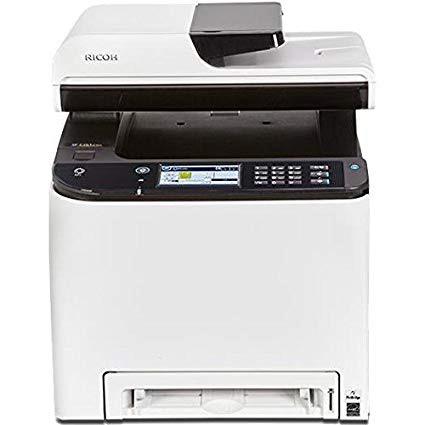
Ricoh 408235 SP C261SFNw Color Laser Multifunction Printer

اكتب تقييم
B076F8GQDB
Target is a general merchandise retailer with stores in all 50 states and the District...

المدينة: KW, New York

Delivery
Pickup at your own expense
Tomorrow from 09:00 to 20:00, Store location
Free
Payment options
Apple Pay Google Pay Mastercard Visa
Cash, bank card, credit/installment payments, cashless payment for legal entities
Warranty and returns
Exchange/return of products of proper quality within 14 days Official manufacturer's warranty: 12 months
Description
This fits your .
Make sure this fits by entering your model number. Up to 21 ppm output, print, copy, scan, fax Up to 2400 x 600 dpi resolution Paper capacity up to 751 pages Wireless and duplex printing standard Easily manage copy, print, scan and fax jobs with a 4.3" touchscreen display
Reviews
3.7
التقييمات: 20
5 نجمة
50%
4 نجمة
10%
3 نجمة
15%
2 نجمة
5%
1 نجوم
20%
Jenna K
3
I was looking to save money in the startup of a new business and liked the higher scanning quality capabilities as I will be scanning a lot of documents. The time spent in set up was/is not worth the cost savings. This printer takes a LOT of googling to find answers of how to do basic things, like scan to email. Should be easy, right? Enter email address and click scan? Nope. User manual is via the web (444 pages!) or the CD provided and has computer geek gibberish instructions. Combination of two web help blogs later, I got it to not give me the error message, but did not actually receive the scanned document in my gmail. Newer laptop detected and downloaded drivers right away but older laptop had to go out to the website to download. Also, first few prints had a lot of extra black on the edges and streaks. Hopefully Ill get the setup figured out and the printing will work its way out to be better quality as I continue to use it. First impression though - go with what you know instead of saving $200. Totally bummed. Will update again later after Ive had it more than a week....
Elisabeth
5
I have only had this printer a few days but so far I really like it. It was easy to set up. Takes a little bit to warm up but after that it is fast. Will update with any changes.
Chun
5
Just got the printer today and already printed over 700 pages. So far so good. When setting up the printer download the driver for the printer off the Richoh website. I chose the wireless setup config which was the quickest to set up. One thing to note when typing your wifi password onto your printer is to click shift to have lowercase letter. I was typing my password in caps the whole time until I randomly click shift and saw it was lowercase.
pksmom
2
Without asking professional set up, we were trying to set up but it takes forever. Wifi doesnt work. Paper is difficult to work with...Even you changed the papers thickness, it doesnt work...So confusing. Not sure if all the better machines are the same. We need help!
G. Cressman
5
The print quality is amazing for a low priced printer. I had no issues setting it up. Sends email from scan, prints from pc and my phone. Its not quick on double sided prints but it does the job well. As other reviewers stated, it will trip an an AFCI circuit breaker. Modern homes have these in bedrooms, so consult an electrician if installing on an AFCI circuit. Regular circuit breakers are not an issue.
Amazon Customer
1
While i have been able to print wirelessly on our network, the scanner utility just says repeatedly "device not ready. check cables and power". Its on a wireless network..... Also, it wont print to our server.
Sharon175
3
I give this printer a 5+ for print quality. I give it a 1 for ease of use. Set-up on our wireless was pretty easy and I was immediately able to print. The issues came when I tried to remove the headers and footers, print envelopes and use the multi-purpose tray. I used the print dialog to setup new Presets and saved them, but I still have to manually change the options for not printing the header and footer. The printer requires an exact page/paper size and I had to have a technically savvy friend show me how to get all the settings lined up to use alternate page sizes (I have yet to get envelopes to print). My friend finally got the correct setup and I can now (occasionally) get a printout from the multipurpose tray. Since I frequently print half-sheets, this has been a true disappointment. I have tried in vain to register the printer - the registration form will not process without a business name and I do not have one. Every phone number I have tried wants a contract number, and I do not have one of those, either, so I have been unable to register or get any assistance from Ricoh. I am printing from a 2017 iMac running High Sierra.
Bigstuff
5
I had another color laser printer that was warning me that drums were nearing end of life and toner was low too. Replacing the drums was a minimum of $125 and toner was about $55-60 each (I needed 3). So I decided to see how much a color laser printer would cost, preferable with AirPrint support. There were printers for $150-170, but then I saw this one. Its a multifunction machine and only $184. No brainer. Features were great, automatic duplex scanning and printing. The last time I looked at laser multifunction/all-in-one machines were WAY EXPENSIVE, but not this one (and I think this is the only one I saw that is under $200). Black toner is cheaper than my previous printer, but colors are more expensive, but the yield per cartridge is better. Print speed is good, print time from sleep is also good, best of all print quality is excellent. Much better than my previous color laser printer, and I was happy with that. It is big and heavy, so make sure you have room for it and a piece of furniture that can support it. Unpacking was easy, as was the setup. I didnt need to refer to a manual for the initial setup and connection to my wi-fi. You will need some tech/networking smarts to set up scanning destinations (e.g. to common network storage, individual computers in your house or office, or to email). Ill confess I still havent gotten scan and send to an email address to work, but I dont really need that so I havent spent much time troubleshooting that to figure it out. If you dont have the tech skills you may want to opt for the Expert Installation option. I havent had a need to use the FAX yet, but I know it works (it picked up voice calls when I didnt answer in time). Test scans and copies all look good too. Great machine and great price. I highly recommend this machine.
B***1
1
Circuit Breaker in the house Trips when Printer turned on. Called RICOH help desk number and explained the situation, but it was a waste of time. The rep said there is something wrong with the house wiring even before he heard what was happening. Tried to explain to him that I had brother laserjet MFC9130, HP Laserjet and Cannon laserjet printers and none of them caused the power trip before. I tried connecting the printer directly to the wall outlet without any other equipment hooked up in the entire room, then used a power strip and also a separate UPS, but none of that helped. I brought MFC9130 printer, hooked up to the wall outlet and powered on and it works fine. The RICOH printer says it uses 11 AMPs and the power capacity in the GFC outlet is 20 AMPS. But the trip occurs not in GFC, but the entire house. Not sure, whether I got a lemon. Not taking a chance again with RICOH products.
Daryel Villavicencio
5
If youve been dealing with inkjets for the past few years, youve been dealing with clogged nozzles, special papers, and expensive inks. Our family would rarely print anything just because you had to deal with cleaning nozzles for 20-30 minutes before you would get decent prints. With this laser, were on our 4th ream of paper of clean good prints (no waste due to bad prints). Ive refilled the toner cartridges (and re-chipped them) once which is an easy procedure. It prints on envelopes, cardstock, labels, and keeps on chugging. The scanner I setup to scan to email, scan to my NAS drive, or send directly to a phone. This really is a great all-in-one solution for printing/scanning needs.

Showing 10 of 20 review

Product variations
Column filling
ترتيب بواسطة السعر ترتيب بواسطة الامكانية ترتيب بواسطة الكود
اتصل بنا لمعرفة السعر
متوفر بالمخزون
B076F8GQDB
You may be interested
  • Bestsellers
  • Recently Viewed
 
Similar products
KD‎ 669.00
Operating System Windows, Mac Printer TechnologyInkjet
KD‎ 379.00
Operating System Printer TechnologyLaser
KD‎ 474.40 KD‎ 1,186.00 -60%
Operating System Windows, Mac Printer TechnologyInkjet
KD‎ 104.00
Operating SystemWindows Printer TechnologyInkjet
Show more




