
Epson Expression Home XP-440 Wireless Color Photo Printer with Scanner and Copier, Amazon Dash Replenishment Enabled
اكتب تقييم
KD‎ 49.00 KD‎ 50.00

Epson Expression Home XP-440 Wireless Color Photo Printer with Scanner and Copier, Amazon Dash Replenishment Enabled

اكتب تقييم
B06W9K5FD2
XP-440
Target is a general merchandise retailer with stores in all 50 states and the District...

المدينة: KW, New York

Delivery
Pickup at your own expense
Tomorrow from 09:00 to 20:00, Store location
Free
Payment options
Apple Pay Google Pay Mastercard Visa
Cash, bank card, credit/installment payments, cashless payment for legal entities
Warranty and returns
Exchange/return of products of proper quality within 14 days Official manufacturer's warranty: 12 months
Features
Connectivity Technology
Wi-Fi
Item Dimensions
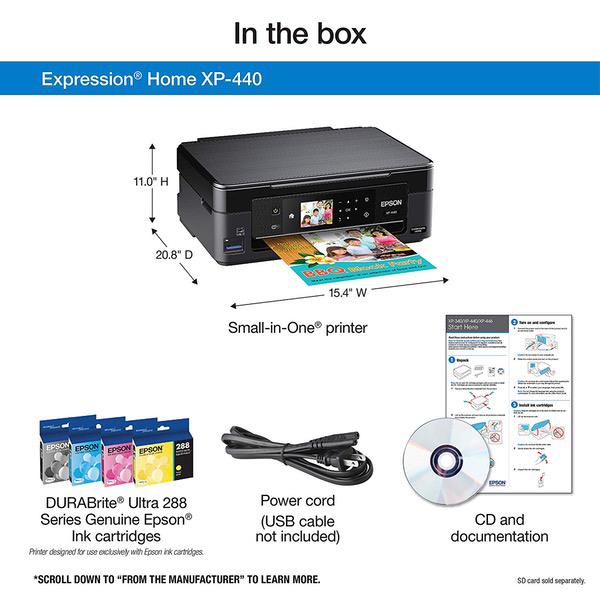
20.8 x 15.4 x 11 in
Item Weight
9.5 lbs
Operating System
  • Windows, Mac
Printer Output
Color
Printer Technology
Inkjet
Style
XP-440
Wireless Type
802.11bgn
Description
This fits your .
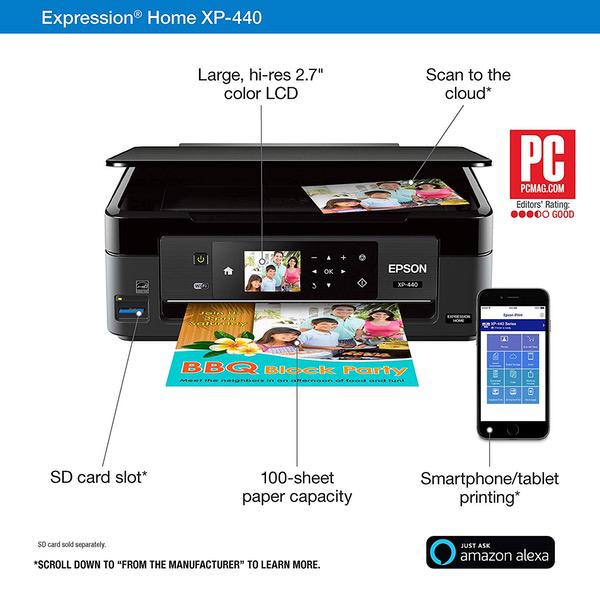
Make sure this fits by entering your model number. Simple setup and navigation — large, hi-res 2.7" color LCD to easily print, copy and scan Complete wireless solution — easy iPad, iPhone, Android tablet and smartphone printing; includes Wi-Fi Direct for network-free printing Affordable individual ink cartridges — replace only the cartridge that runs out Creative Print mobile app — easily create custom borderless photo collages from Instagram, print stationery and more Reload paper less often — 100-sheet paper capacity Never run out of ink again - Printer features Amazon Dash Replenishment which, after activation, keeps track of your ink usage and orders more from Amazon when you are running low NOTE: Please refer to the installation manual for trouble shooting steps
Reviews
1.5
التقييمات: 20
5 نجمة
5%
4 نجمة
0%
3 نجمة
5%
2 نجمة
15%
1 نجوم
75%
George
1
A good little printer, BUT no longer uses 3rd party ink cartridges. I purchased a number of print cartridges from a 3rd party, last year they worked fine, now when I load them I get an error message telling me they arent Epson cartridges, and the printer wont work at all. The ink vendor tells me "Epson company has updated their printer models that use 288XL ink cartridges in early 2018. I am afraid this not recognizing issues of the ink cartridge is caused by the lately printer update." Sorry Epson, BAD CORPORATION!
pjprnyc
1
We have had this printer for just over a year. Just enough time for it to stop recognizing the ink cartridges are full and to stop feeding paper but also be out of warranty. I will not be replacing this with another Epson.
Jack
1
of course, the black ink wont work. I was only able to use it a short while before it blocked the black ink! I ordered new ink, but had to wait forever for it to come. I had previously ordered ink, so I would have some available. Epson sent the wrong ink. I needed 280/288 ink, but Epson sent me 220 ink. The printer did not recognize it! And I had ordered it a few weeks ago. however, Epson does not give refunds after 30 days (bad policy). When the black ink went out and I tried using the 220 ink that I thought was for my printer, I ordered new black, wait, wait, wait. Put the cartridge in, but nothing came out. Then, I had to go online to find out what was really going on (blocked jet). Yes, I could have kept on doing a head clean, but that uses WAY too much ink. NOW, Im waiting for an head cleaning kit (not from Epson because they do not make one!). Pretty sorry way to do business. Ive used Epson printers for years, but this is a sorry situation, one that Epson should foresee and fix ahead of time.
Amazon Customer
2
I really want to like this printer. But, as the old saying goes, you get what you pay for. It works, OK. Its quite slow, and the most important thing, The ink is more expensive than the printer itself and only lasts for maybe 100 pages. I wish I had listened to the other reviews I read about the ink, I just didnt expect to run out so quickly. The reason this printer can be so expensive is because they get you in the long run with the ink.
Nick
1
The red nozzle got broken in 3 months. Wasting my time.
Leroy Jenkins
2
This is a low end printer, do not let the fancy advertised photos fool you. It prints slow (even Word docs), the scanner is slow, on board controls are slow, the control panel feels super cheap and the scanner lid falls off easily. The replaceable ink is expensive (even the third party ink). Do yourself a favor a pass on this one. Spend the extra 20-40 bucks and get a nicer one. Additionally, you better have an internet connection as well because there was no CD for driver installation. Ill definitely be going back to HP after this.
***
1
Epson implemented Jan 2018 firmware that prevents use of 3rd party ink cartridges. This means printer will reject non OEM cartridges, forcing customers to pay up to $103.00 for Epson ink. When you unbox and setup printer for use, printer will ask to update firmware. If you proceed, Epson will install illegal (Supreme Court Ruling) firmware, modifying printer to reject non OEM ink. Fortunately you can hack firmware to older version fairly simply using internet posted instructions. If you are willing to invest time performing hack, printer represents great deal. Otherwise, stay away. Update: To make your life even more difficult, Epson has placed page-counter chips in all cartridges. This implies cartridge will basically self-destruct after page-counting IC has determined you have printed enough pages (even if cartridge is not empty). This is Epsons response to customers who may want to refill cartridges and ovoid paying for new Epson brand cartridges. There are cartridge reset products out there that will electronically reset counter IC to zero, however none are available for this brand cartridge. This product should be avoided at all cost...
Susan Wright
1
I ordered two of these for my home and I have had the same problem with both of them: when I get the message on the printer to replace the ink cartridge and i go ahead and do that, the printer never "gets it" that I HAVE. THE INK CARTRIDGE HAS BEEN REPLACED - its a new cartridge!!!!! Ive tried different cartridges, Ive read and reread the instructions and have pushed down on the cartridge where it says "push," and Ive even hit it in that spot with a hammer. Ive had several other people try to get the printer to recognize the replacement ink cartridge with no luck, so - bottom line - I cannot print anything on either of them. VERY FRUSTRATING! Replaced these with an HP OfficeJet 4650, which Im very happy with.
TravelFairy
3
Cheap, easy to set up. It was a bit unreliable in the beginning, losing connection sometimes or having the print jobs error out. Then at some stage it started printing things weirdly (missing random lines of text), then started working again all by itself. Its a $50 printer though, so expectations should not be high. I agree with the reviewer that youre almost better buying another printer than buying the ink (as the ink comes with the printer). Im going to do that once - that way I have a spare printer, and spare color cartridges. Then Ill just buy individual black ink cartridges. I will say that it ran out RIDICULOUSLY quickly. I saw one reviewer said it lasted 100 pages - mind didnt last 50, and I was just printing shipping labels and delivery notes, so nothing that uses much ink (like photos).
kc
5
Setup was very simple - - remove some stickers - insert ink - plug it in - navigate to setup - wifi - it found my network - use the arrow keys to enter the passcode - done, it was on the network - my computer saw it and was able to print to it Other positives from initial use: - Print quality is excellent. - The size is nice and compact, with the paper in the back and the print tray tucking away when not in use it takes just a little bit desk space. - individually replaceable ink tanks is nice and more efficient than having all the colors in one - Packs in a single sheet scanner and copier in as well The price point for all of this is remarkably low. It packs a lot of functionality into a small, nicely priced box. The only thing I feel is missing relative to a higher end model is a multi sheet feeder for copying/scanning. A note on price though: Obviously the "game" here (and with all these color ink jets) is that theyre practically giving away the device to sell the ink. At the current pricing, the cost of a set of replacement ink is about 60% of the cost of the entire initial purchase (which includes a set of ink). That is, 40% of the initial purchase is the hardware and 60% is your first set of ink. So moving forward, each set of replacement ink you buy costs more than the hardware! So to understand the economics of buying this (or any printer), you want to look at ink costs relative to your expected printing volume. If you have very low volume of printing a sheet or two now and then, this is a steal at this price. If you print more than that, then ink costs are more important than initial costs and the replacement inks on this one arent cheap.

Showing 10 of 20 review

Product variations
Column filling
ترتيب بواسطة السعر ترتيب بواسطة الامكانية ترتيب بواسطة الكود ترتيب بواسطة Style
اتصل بنا لمعرفة السعر
متوفر بالمخزون
B0777RCZGN
Style:
Printer and Ink Combo
KD‎ 49.00 KD‎ 50.00
متوفر بالمخزون
+
B06W9K5FD2
Style:
XP-440
You may be interested
  • Bestsellers
  • Recently Viewed
 
Similar products
KD‎ 669.00
Operating System Windows, Mac Printer TechnologyInkjet
KD‎ 379.00
Operating System Printer TechnologyLaser
KD‎ 474.40 KD‎ 1,186.00 -60%
Operating System Windows, Mac Printer TechnologyInkjet
KD‎ 104.00
Operating SystemWindows Printer TechnologyInkjet
Show more




