
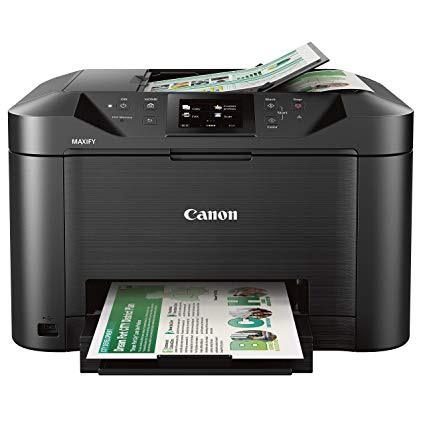
Canon Office and Business MB5120 All-in-One Printer, Scanner, Copier and Fax, with Mobile and Duplex Printing

اكتب تقييم
B01IIOMMGE
MB5120 Wireless Printer
Target is a general merchandise retailer with stores in all 50 states and the District...

المدينة: KW, New York

Delivery
Pickup at your own expense
Tomorrow from 09:00 to 20:00, Store location
Free
Payment options
Apple Pay Google Pay Mastercard Visa
Cash, bank card, credit/installment payments, cashless payment for legal entities
Warranty and returns
Exchange/return of products of proper quality within 14 days Official manufacturer's warranty: 12 months
Features
Connectivity Technology
USB
Item Dimensions
18.3 x 18.1 x 11.5 in
Item Weight
25 lbs
Operating System
  • Windows, Mac
Printer Output
Color
Printer Technology
Inkjet
Style
MB5120 Wireless Printer
Wireless Type
802.11bgn
Description
  • Print Features: AirPrint, Auto Duple Printing, Canon Print App, Google Cloud Printing, Microsoft Mobile Print, and Moria Device Printing, 250 Sheet Paper Capacity
  • Copy Features: Single Pass 2-sided Copying and ID card copying
  • Scan Features: Single Pass 2-sided Scanning, Push Scan, Scan to Memory(USB Flash Memory), Network Scan, Scan to Cloud, Scan to Concur, and Scan to Network Folder
  • WHAT'S IN THE BOX: MB5120 Printer, Setup CD-ROM, Full Set of Ink Tanks and Power Cord, Telephone Line Cable
Reviews
3.9
التقييمات: 20
5 نجمة
50%
4 نجمة
20%
3 نجمة
5%
2 نجمة
15%
1 نجوم
10%
Korby
2
Im afraid I have to disagree with other reviewers. Ive had this printer since last Nov and Ive been disappointed. First-out speed is remarkably slow, and print speed is also disappointingly slow. The printer is noisy. And the color quality is very bad, not true at all. Im using Canon ink. This printer is definitely not worth $250. I regret buying it.
dhump33
2
Very dissatisfied and disappointed with this printer. The thing that continues to dig Canon is their software. I spent hours trying to set up the wifi connectivity, watched countless videos, and read countless instructions. The machine e is great if your connecting USB style but who does that no a days?! Im trying a Brother printer for the first time and Im hoping that connectivity wont be an issue.
jnr
2
If you need to print a business check, envelope, or photo--basically, anything other than a standard letter size--you have to replace the paper in the cassette and manually select the paper size now in the cassette. Then, you have to repeat these steps to put standard paper back into the cassette. This is incredibly inefficient. My previous canon printer had an additional feed tray where I could easily insert a different paper, and it automatically read the paper size! I researched a number of printers before settling on this one. My mistake for assuming this machine would have an additional feed tray or a better way to handle different page sizes.
Product variations
Column filling
ترتيب بواسطة السعر ترتيب بواسطة الامكانية ترتيب بواسطة الكود ترتيب بواسطة Style
اتصل بنا لمعرفة السعر
متوفر بالمخزون
B01IIOMMGE
Style:
MB5120 Wireless Printer
You may be interested
  • Bestsellers
  • Recently Viewed
 
Similar products
KD‎ 669.00
Operating System Windows, Mac Printer TechnologyInkjet
KD‎ 379.00
Operating System Printer TechnologyLaser
KD‎ 474.40 KD‎ 1,186.00 -60%
Operating System Windows, Mac Printer TechnologyInkjet
KD‎ 104.00
Operating SystemWindows Printer TechnologyInkjet
Show more




