
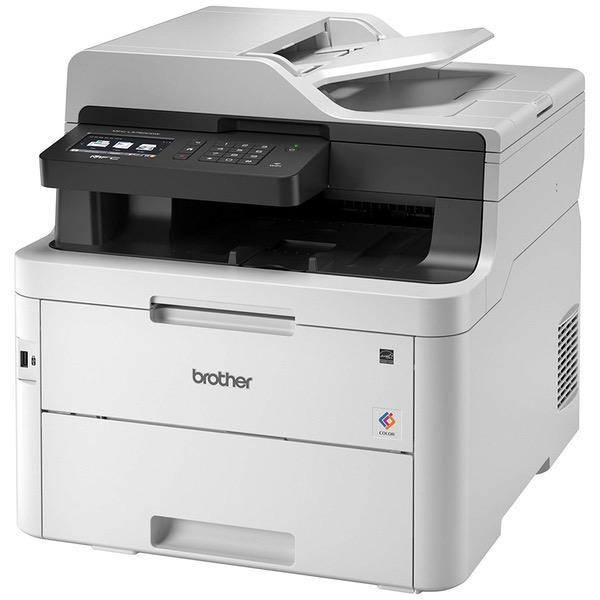
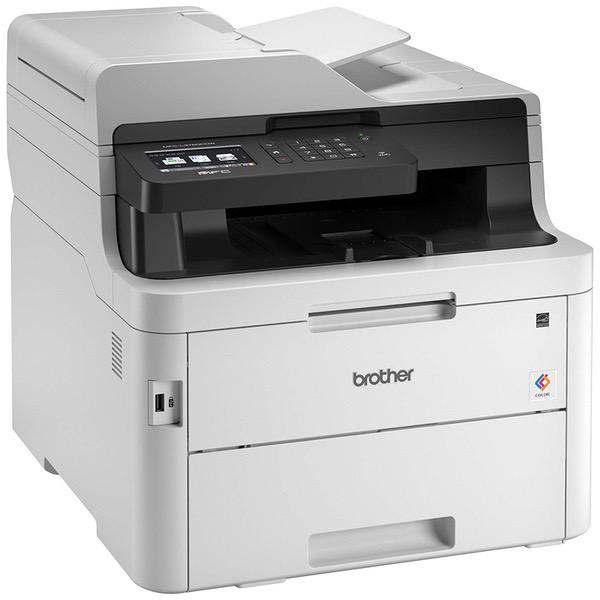
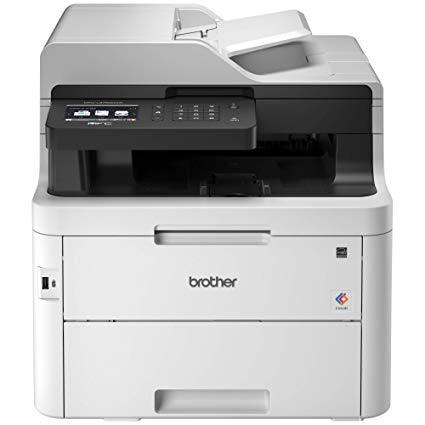
Brother MFC-L3750CDW Digital Color All-in-One Printer, Laser Printer Quality, Wireless Printing, Duplex Printing, Amazon Dash Replenishment Enabled

Write a review
B07FMS1JSS
New Model: MFC-L3750CDW
Target is a general merchandise retailer with stores in all 50 states and the District...

City: KW, New York

Delivery
Pickup at your own expense
Tomorrow from 09:00 to 20:00, Store location
Free
Payment options
Apple Pay Google Pay Mastercard Visa
Cash, bank card, credit/installment payments, cashless payment for legal entities
Warranty and returns
Exchange/return of products of proper quality within 14 days Official manufacturer's warranty: 12 months
Features
Connectivity Technology
Wi-Fi
Item Dimensions
18.7 x 16.1 x 16.3 in
Item Weight
51.5 lbs
Operating System
  • Windows, Mac
Printer Output
Color
Printer Technology
Laser
Style
New Model: MFC-L3750CDW
Description
This fits your .
Make sure this fits by entering your model number. Fast Print and scan. The Brother MFCL3750CDW lets you get things done with up to 25ppm Print speed and scans up to 25 ipm black and 22ipm color Enjoy affordable and flexible color printing. Affordably Print professional-quality, rich, vivid color documents that get noticed 3.7" color touchscreen. Print-from and scan-to popular cloud apps - Dropbox, Google drive, Evernote, OneNote2 and more from the touchscreen. No Duplex Scanning Print and Connect your way. The MFCL3750CDW has mobile device Wireless printing, 1 built-in Wireless, Ethernet, Wi-Fi Direct and USB interfaces For use with Brother Genuine Toner. TN223BK, TN223C, TN223M, TN223Y, TN227BK, TN227C, TN227M, TN227Y
Reviews
2.9
Reviews: 20
5 stars
25%
4 stars
20%
3 stars
10%
2 stars
5%
1 star
40%
Kurt
5
My second Brother printer. First one didnt copy and scan. I regret not buying this one sooner. Great product! And if you havent done so Google how to reset your toner cartridges. You will get months of more printing out of them! Do not change your cartridges when it says! Reset them and keep printing. Easy to reset. I just write down which one I reset and when the color starts to deteriorate I know which one to change. Im not joking you will spend half in toner if not more. Mine is used in a work environment and we literally get three more months out of a cartridge after resetting until its really empty. Such a scam
Daniel C
4
Very happy with this purchase. My old Epson inkjet workforce lasted me for 5-6years. But the cost of The of the ink was just to much. And yielded small page counts. Color ran out fast. And if you didn’t print anything for a weeks time (common in this household) it would dry up and be a pain to clean. All of these cons are avoided with this brother color laser. I can still fax purchase orders, send emails, print from usb, print from my iPhone with Apple AirPrint(new feature for me), scan large documents with feeder or hires on the flatbed. And it’s a duplex printer (lamen-terms: Both sides of paper). And yes, while the ink is still expensive, because of the nature of the ink design (toner cartridges ...powder) it can’t dry out. And the large cartridge sizes permit far larger print yields. By this I mean 1,000+ pages easy per cartridge versus a 100-300 with my old epson. I highly recommend this printer for home and small business usage. Brother products have far exceeded my expectation in build quality compared to history. The only reason I have rated at 4 stars is the GUI(Graphic User Interface). But honestly, it’s only worth a half star demotion. While fairly intuitive, some settings and print options are not. All in all this is an amazing printer
Jean B
3
So far its a good printer. I love the duplex function. It saves lots of time and money. But, the toner cartridges dont seem to be big enough to hold much toner. and the biggest BUT, if you are looking to print lots of label sheets, look elsewhere. Its painful. Each sheet must be loaded by hand into the front of the machine. The guides are not sturdy enough to keep the sheet in place if you push it in the slightest bit off center. And if you dont push the sheet in just right the first time, it keeps asking you to remove it to fix the jam. If I had known that, I would have looked elsewhere, or spent the money to fix my 10 year old Oki Laser that was an amazing machine but was starting to need $160 drums. Might have been a better investment. August 2018 Update I should have tried to fix the OKI printer. This printer goes through toner like theres no tomorrow. The ink cartridges claim to be high capacity but I am currently on the 3rd black cartridge since I purchased it at the end of November 2017. My printing habits have not changed since I changed from the OKI. Not happy!
Metalcastr
4
Its a good small-business-grade color laser. I bought it for home use to print color without breaking the bank. My old inkjet was costing a fortune in ink and could not print many sheets without needing expensive cartridges. Therefore the solution was to get a color laser printer. Theyre significantly more expensive than regular inkjet printers and B&W laser printers, however they really pay off in the long run. Ive saved more than the purchase price of this printer in ink savings quickly. My only regret is not getting the model above it, MFC-9340CDW, which has dual-side scanning in the paper feed. That would have saved me a lot of work, however its my own fault for not getting it, so no points off for that. As for printing quality, its great for sheets that need some color to look good. Its not for photos, although the highest quality setting produces "good enough for me" full page photos. These will look OK on the fridge but not up close. Its not going to be comparable to a high-end inkjet however, and you cant use glossy inkjet paper in laser printers. NIC port fix: Recently I came across a strange issue, and found a solution. For the first time in several years of ownership, the built-in network port (NIC) stopped working. Ive tried everything to get it to work again, such as enabling DHCP as it was set to a static address, changing network cables, changing ports on the router, rebooting the printer, etc. The strange thing was is that the NIC was working, and the switch port on the router was blinking, just no traffic could flow to the printer itself. It would not take an IP address, static or DHCP. The solution was to perform a Network Reset on the printer, which is separate from the above troubleshooting steps. Heres how: On the main menu, press the small settings icon in the upper right corner, go to All Settings, Network, Network Reset, Yes. It will ask to reboot, hold Yes. The printer will reboot, and afterward youll need to set your network settings if youve had them set previously, such as a static IP, gateway, etc. This special reset must flush some software stack interfacing between the NIC hardware and printer firmware.
Amazon Customer
1
We previously had a Brother MFC9560CDW. This 9330CDW machine is incredibly inferior and we were hoping that since it was still in the 9000 range of Brother machines that it would be a good replacement. After 6 yrs, our 9560 began spitting out entirely black pages intermittently and although we consulted many on line sources, trouble shooting etc. we were unable to fix it. We then ordered the Brother MFC9330CDW recently from Amazon and did not realize that although it does receive and scan in duplicate (both sides) it will not fax out in duplicate. That means we either have to photo copy 2nd sides before faxing or turn the whole stack over and let the receiver try and match them up. This machine also has an 11 inch space on the face of it where the 2" x 3" touch pad resides. Our old machine had actual buttons taking up the exact amount of 11 inch wide space, which a person could see well. Having to scroll for ALL functions on a tiny touch screen is not an improvement over physical buttons unless the touch screen was larger or the font was larger, preferably both. This is a machine for home use only, DO NOT BUY FOR AN OFFICE.
James Peters
1
This is disappointing relative to the quality and feature set that Id come to expect of Brothers excellent series of office multifunction machines. I bought this to replace an older Brother MFC that had too many worn components to be cost-effective to fix, and I was looking forward to the color upgrade. However, it turns out that unlike the older units, the scanner/feeder on this lacks a duplex mode. I get a lot of double-sided mail in my work with government agencies, so lacking duplex is a very big issue. I cant call it a defect per se, but its a very significant omission on a product that does advertise duplex (printing). In terms of the other core function, printing, Id rate the performance as merely adequate. Color quality is really subpar compared to the old Dell I use in my home office; at this point I choose to print at home when color really matters, although really it doesnt much matter for most office uses. The only thing I really use color for is to make my letterhead header stand out a little. Still, its not the quality of color Id like to see. Printing speed is also a bit disappointing. The page rate is fine if printing a long document, but most of my printing is short documents, and the startup time from when I send a document to the printer is very long, as much as 20 seconds sometimes. Finally, and this is really an odd one, its strangely difficult to retrieve printed documents from the printer. I guess its designed more for legal size pages? Documents are left deep in a little cave and flush to smooth plastic, so its a bit of a dance to retrieve a stack of pages from inside the printer. That couldve been very simply avoided by adding some kind of texture or ribbing to the surface, which they used to have on the old models. Manual feed is horrendous. Printing envelopes on this printer is a hair-pulling experience. Half the time I just give up and hand-label the envelope, its faster. To print an envelope, you have to manually tell the software to select manual paper feed as the printer isnt smart enough to figure it out. But to print from there theres a specific process. You cant just stick an envelope in and click print, if you do that it will declare theres a paper jam and make you remove the paper and hit a button on the touchscreen, then wait about ten seconds for it to ask you to load paper, then try inserting it again. Its a highly labor-intensive process. For an office printer, this is completely unacceptable. I regret that I didnt more thoroughly test this printer right when it arrived. If I had, I wouldve returned it. As it is, Im tempted to "upgrade" to another brand prematurely and just try to resell this one at a substantial loss. Its junk, dont waste your money.
Tubesource
4
I reeeeeally hate printers in general after doing computer service for several years. I wanted a home printer that would sit quietly and spit out paper whenever I needed, whether it be one page per month (which costs you about $150 every 6 months on an inkjet because the darn ink dries right out) or a 500 sheet copy run which is simply stupid to try on an inkjet. I also use/print from Linux computers only. This printer does have linux driver support and, with relatively little fiddling, worked well to print from Ubuntu and Antergos based systems. Colors are excellent and black prints are razor sharp as expected from a laser/led printer. Have the scanning section set up to scan directly to my NAS, no fiddly software to deal with. If that fails you can scan to a flash drive plugged directly into the unit which is an excellent standby option! Does not appear to scan to email like some high-end office units but I didnt want that anyway. I dont know anything about cloud/internet printing features as I dont need those for my purposes.
TheGoodLife
5
Absolutely great printer. I have it a mixed Mac/PC envirmonment without any issues. Prints from all my portable devices as well. Very, very easily to set up. Menu is great. Foot print of the printer is about as small as possible for the given function. It also seems a bit less of an energy hog. The lights on the same circuit doesnt blink when the printer starts. And, its one of the quietest printers that I own. Ive had good luck, really good luck with Brother printers compared to other brands. This is no exception. BTW...read the first review on this product..theres a way to trick the printer into thinking the toner is not empty. Brother printers, and really all printers I use always report toner empty prematurely. Ive used this the trick and have gained at least 50% in life of the toners. I actually bought this printer because of that hack...
Grumpy Whiny Old Man
1
The Brother MFC-L3750CDW Digital Color All-in-One Printer, Laser Printer Quality, Wireless Printing, Duplex Printing, Amazon Dash Replenishment Enabled is one of the worst printers I’ve ever owned. I’ve struggled with paper feed/jamming problems for nearly a month. This morning I wanted to print 4 business size (monarch) envelopes and ended up wasting an even dozen because only the first in the set would feed properly. Pros Quick and easy setup. Took me about 15 minutes. Quiet. Like quiet conversation in the living room quiet – about 47 db while running! Excellent color management for file printing. Much better than I expected from a laser printer Compact – relatively small footprint for a color laser printer. Prints nice crisp text and decent color images when used as a copier. Acceptable images when using as a scanner. On/off switch located conveniently on control panel on front. Good size control panel. Easy to see even for an old fart with poor eyesight like me. Unlike the MFC-L3710CW it does not turn itself off after several hours of idle – it sleeps but the next print job wakes it up. Neutrals: Did not test or use wireless access Did not use or test FAX function Cons Auto feed for print/scan is touchy. Document must be perfectly centered in tray or the belt eats it. Sometimes paper is destroyed even when perfectly aligned. Outfeed tray is under the scanning tray and only one corner of printed documents can be grasped. Relatively difficult to get ahold of the paper if you have large hands or hands limited by things like arthritis. Manual infeed tray isnt really a tray - just a very narrow drop down cover. Unlike many other printers there is no pull out tab(s) to support the paper being fed. Even 20 lb bond paper falls out. Feed rollers wont grab anything thicker than 20 lb bond paper. Anything thicker must be forced into the feed rollers. Cardstock makes something in the feed mechanism squeal as it passes over/through that point. Can place only one sheet of paper on manual tray. Slow to start a print job – depending on file size, up to 40 seconds. Most disturbing issue is that all paper thicknesses, even 20 lb plain printer paper, jam constantly. I spent more time pulling toner cartridges to clear jams than I did printing. I bought this printer for three reasons: 1. It is advertised to print on cardstock – but as per manufacturer, only very light weight 2. I’ve been happy – no, ecstatic – with the functionality and durability of my Brother monochrome laser printer that cost about $60 brand new half a decade ago. A shame Brother no longer makes equipment of same excellent caliber. This is the second Brother color laser printer I’ve purchased in the last two months. Both have been returned for refunds. It will be the last Brother product I ever purchase.
techfan
5
Pros: Solid construction, great print quality, multi-function, easy to use, long lasting ink. Cons: Heavy/large, duplex tends to jam, so/so photo quality. Quite simply, yippee! I dont know how long the toner cartridges last, but Ive had the printer for a few years now and still havent replaced one. Also, and it may seem like a minor thing, the printer just works, every time, without headache. I cant tell you how awesome this is by comparison to the fleet of ink jet printers, and mountain of ink jet cartridges, Ive burned through. I will never buy another ink jet printer. Theyre much better at generating cartridge sales than printing.

Showing 10 of 20 reviews

Product variations
Column filling
Sort by Price Sort by Availability Sort by CODE Sort by Style
Contact us for a price
In stock
B07FMS1JSS
Style:
New Model: MFC-L3750CDW
Contact us for a price
In stock
B00C6MNQ92
Style:
MFC-9330CDW
You may be interested
  • Bestsellers
  • Recently Viewed
 
Similar products
KD669.00
Operating System Windows, Mac Printer TechnologyInkjet
KD379.00
Operating System Printer TechnologyLaser
KD474.40 KD1,186.00 -60%
Operating System Windows, Mac Printer TechnologyInkjet
KD104.00
Operating SystemWindows Printer TechnologyInkjet
Show more




