
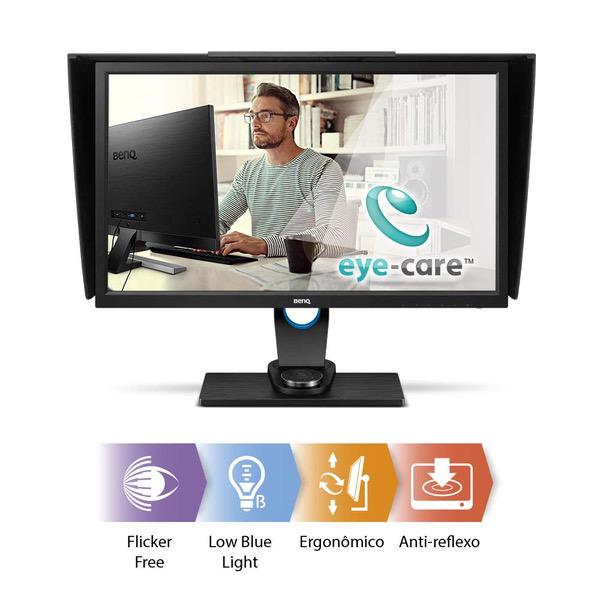
BenQ SW271 PhotoVue 27 inch 4K Photgraphy IPS Monitor | AQCOLOR Technology for Accurate Reproduction
Write a review
KD439.60 KD1,099.00

BenQ SW271 PhotoVue 27 inch 4K Photgraphy IPS Monitor | AQCOLOR Technology for Accurate Reproduction

Write a review
B076CTL3BD
It’s Black Friday all month long with new deals each week.
Promotion expires within:
+
Add to wish list
Target is a general merchandise retailer with stores in all 50 states and the District...

City: KW, New York

Delivery
Pickup at your own expense
Tomorrow from 09:00 to 20:00, Store location
Free
Payment options
Apple Pay Google Pay Mastercard Visa
Cash, bank card, credit/installment payments, cashless payment for legal entities
Warranty and returns
Exchange/return of products of proper quality within 14 days Official manufacturer's warranty: 12 months
Features
Display Type
LCD
Item Dimensions
19 x 13 x 25 in
Item Weight
0.24 ounces
Mount Type
Wall Mount
Refresh Rate
60 hertz
Screen Size
27 in
Aspect Ratio
16:9
Description
This fits your .
Make sure this fits by entering your model number. 27 INCH 4K UHD RESOLUTION: Exceptional clarity of fine details HIGH DYNAMIC RANGE (HDR): for sharpened brightness and incredible details.Dimensions (HxWxD mm) (w/o Base) (with shading hood) 14.65X24.64x9.37 inches Dimensions (HxWxD mm) (w/o Base) 14.52x24.16X2.46 inches AQCOLOR TECHNOLOGY: 99% Adobe RGB coverage, hardware calibration support for accurate colors for photography. Card Reader Support Format: SD/SDHC/SDXC/MMC USB TYPE-C: Transmit data and video signal with one cable for easy hardware calibration. Video Signal Data : Horizontal Frequency - 27~140Khz. Vertical Frequency - 24~75Hz. Video Bandwidth - 600MHz HARDWARE CALIBRATION WITH PALETTE MASTER ELEMENT SOFTWARE: Tune and maintain the color performance of the monitor at its most optimal state
Reviews
4.1
Reviews: 20
5 stars
65%
4 stars
10%
3 stars
10%
2 stars
0%
1 star
15%
Celestial Lady
5
This is absolutely the best monitor I have ever owned in the 33 years since I first got a desktop system in 1984. I do professional book design and now I can see the actual colors that will print and/or display, particularly for covers that are used for print and also for online viewing. The packaging was excellent. The Quick Start instructions were a little hard to follow because they were all in pictures, but it all came together well. I have never had a monitor with a hood, and it really helps. For those people who complained about the OSD buttons on the monitor frame, just use the OSD Controller puck. It makes everything as easy to access as navigating through a menu on a cell phone. Also, it helps to read the manual! The colors in Adobe RGB are sensational and really make a difference when viewing web sites, Excel files, and anywhere that I use color. In addition, we use this system to watch videos, and the clarity and color are breathtaking. I only have been using this for 3 days, so these are first impressions. Today, for no apparent reason, something set the display to B&W (Firefox crashed when it happened), and BenQ tech support was great! The man was patient with my inexperience and walked me through the steps I needed to know to reset the color settings. Im in monitor heaven now!
BC
3
BenQ customer service is excellent. I needed them. The set up is supposed to be simple. Plug in the power and Thunderbolt cable and good to go? NOT. Im using it with MacBook Pro (2016) requiring the Thunderbolt 2 cable. After many attempts and conversations with Apple and BenQ, BenQ concluded that monitor faulty. Returning a 27" monitor is not easy. I ordered identical monitor and set up was successful. HOWEVER, one day I needed to take the laptop with me and disconnected the cables from the laptop (but NOT the monitor). Upon return, the monitor would not work. I then ordered a new Thunderbolt cable from Amazon and it has been working great since. No matter how hard I tried or how many times I tried, I could not get the miniport end of the Thunderbolt cable to slide all the way into the port to make a good connection. BESIDE the bad cables (yes, two of them) another issue is that the designers evidently want the back of the monitor to look great so instead of just plugging cables into the back (like my Mac 27" monitor), you have to shove the cables up from below into the ports. They are out of sight so I had to tip the monitor up into precarious position in order to plug in the power, usb cable, Thunderbolt, and OSD controller.
Amazon Customer
5
We work in graphic design and I decided it was time for my partner and lead designer to make the switch from Mac. We were both Mac users for decades so this decision wasnt taken lightly. I switched over a year ago and it went pretty smoothly but I knew it would be a challenge to get my partner to accept the change with enthusiasm. This monitor really helped. It is gorgeous. The hockey puck controller is a nice touch and allowed us to quickly adjust color model. Monitor came factory calibrated and we havent connected an external calibrator just yet but it is clear the hardware is set up to easily accept it. Ergonomics make up for smaller 27" screen size. I work on a 27" vertical HD monitor next to a 4k 32". Even with my nearly perfect spread for my work I pine for this monitor instead! Layout, stand and ports are very thought out. Included stand is almost as good as my articulated monitor arms. Cable routing, a pocket for controller and easy height and angle adjustment make up for reduced motion and desktop space. If you are a graphic designer who needs critical color matching this is worth a look.
W. Gipson
4
Pros: great color rendition Cons: It frequently needs to be reset, eg. turned on and off, after restart or boot-up to prevent the screen from blinking on and off as well as avoiding random white lines across the screen. However, despite the nuisance of occasionally turning the monitor on and off to reset certain problems, I would buy it again. The price and color rendition is just too good to avoid. I wish there was a 4.5 star rating.
Steven C. West
5
Been using this for about a year. Bought primarily for Lightroom photo work. Very happy with the performance and color accuracy. I have not had a single problem with it. I recently built a new computer and was about to buy a card reader for it (My old computer had one built in). I then realized that this monitor already has an SD card reader built into it (and a couple USB 3 ports)! Just needed to hook up a cable I hadnt used and install the card reader driver. Very nice. I used HDMI with my old computer, but moved to DisplayPort with this build. I appreciate the monitor support articulation built into the mount. You can turn it vertical, but I have never used it that way. Color calibration resulted in an almost imperceptible change, so for now, I havent done a calibration with the new computer. I would buy this monitor again without reservation.
Jerry W. Vaughn
5
I bit the bullet and spent more dollars than I ever have to buy the BenQ monitor. I was replacing a monitor that I liked (not BENQ) that had died. After using the monitor, especially photo editing, for several months I just love it! The color rendition is great; the size of the monitor is great; and it works well for doing video (no smearing). All in all - money well spent. In my environment I chose not to use the hood so I cant anything about it. The puck for controlling the monitor just seems like a gimmick to me. I dont ever switch color space and rarely tweak the monitor so the puck just sits in in its tray. I don’t game so I can’t say how well it might work for that. I used my Spyder3 to calibrate it to the RGB color space and worked fine. I could not use the monitor hardware with the Spyder3 but that was OK with me. The calibration check amazed me as to how close the monitor came to the RGB spec.
Bob in California
1
I am a photographer and needed a new 27 monitor. Given the good reviews this product received on line I purchased it. It came very nicely packaged but it was downhill from there. It comes with a "factory" color calibration sheet with shows it passed but I could not ever get it to pass the calibration with the Palette Master Software which was enclosed with the unit. I used my x-rite calibrator (which the software recognized with no problem) and the monitor repeatedly failed. I uninstalled the software several times to no avail. I tried to email customer support and did not get an answer for a week.( It was useless at any rate when I got it.) I called the US number but the tech who answered the phone knew nothing about calibration and the expert was unavailable that day. After several days of calling I spoke with Sean LeBlanc who was helpful but ultimately deferred to Taiwan where their calibration expert was on vacation. In the interim I returned my first unit and received another with the same results. I purchased a new x-rite pro calibrator (hoping to eliminate that as a problem) and the new monitor failed on their own calibration software and then it locked up during calibration with a washed out screen. In the interim Sun Yi replied from Taiwan " It is strange that both displays are failing calibration. How did you have everything connected? Did you have the USB properly connected to the monitor?... I’m not saying you’re unlucky but for that to happen to you with 2 different monitors is highly unlikely.I apologize if it seems like a simple solution but that would be the first line of questioning in regards to connection issues or failed calibrations." I then returned the second monitor. I would skip wasting time this company completely. "
Chas Nick
4
I have been using this monitor for several months. It is a good monitor but I was a little disappointed in the screen uniformity. The top right corner of mine has light bleed on dark screens. I do not notice it most of the time but it is there on dark backgrounds. For a photo monitor that is concerning. Calibration on it with my X-Rite pro has been hit or miss. Sometimes it calibrates to a very low deviation. Other times not so much. All in all I like the monitor. The look of it is quite nice and the hood is of very good quality. There are a couple of things which kept it from getting a higher rating from me.
Alexander P. Noriega
5
Out of the box, this thing hardly needs calibration - mine hits 6470K pre-calibrated from the factory, and the best I can do with an X-Rite i1 DisplayPro is 6510K, which is only slightly closer. The only real adjustment youd need to do, other than setting the OSD to 6500K and 2.2 Gamma, is setting the brightness around 25-30 to hit that 120cd mark, as it is WAY too bright out of the box unless youre using it in broad daylight outdoors. Nice connectivity, sturdy stand with rotation built in, and comes with optional light shields to block ambient light if you dont have control over that yourself. No ghosting when gaming at 60Hz either, and its clearer/sharper than my 1440p LG IPS LED that Ive got sitting next to it at the same resolution.
Alyssia McCaslin
5
As a photographer I was so frustrated with my laptop monitor, I even went out and bought a spyder which only furthered my resolve that I couldnt keep guessing my that image edits were ok & needed a new monitor. I kept having to upload my images to a gallery and check them on my phone to make sure they were accurate. It was horrible and time consuming. I threw in the towel and decided the BenQ was worth the price, and OMG the difference is amazing, so accurate right out of the box. I love it so far. My photo editing has been streamlined and its saving me so much time!

Showing 10 of 20 reviews

You may be interested
  • Bestsellers
  • Recently Viewed
 
Similar products
Show more




