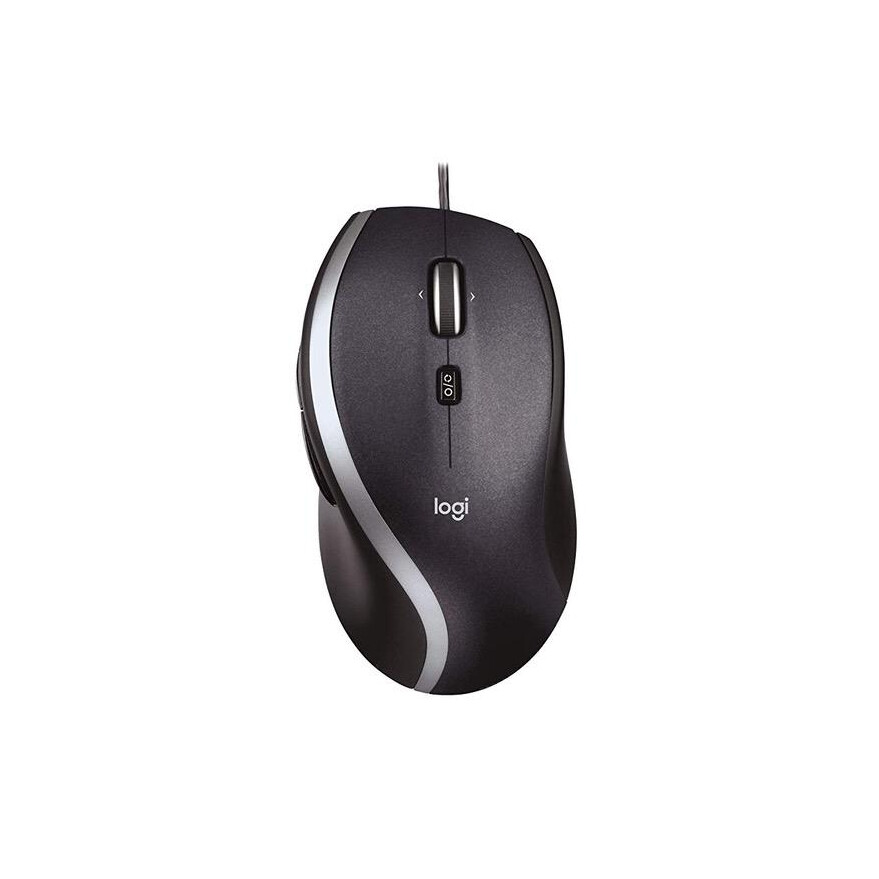

Logitech M500 Corded Mouse – Wired USB Mouse for Computers and Laptops, with Hyper-Fast Scrolling, Dark Gray
Write a review
KD24.00 KD50.00

Logitech M500 Corded Mouse – Wired USB Mouse for Computers and Laptops, with Hyper-Fast Scrolling, Dark Gray

Write a review
B002B3YCQM
+
Add to wish list
Target is a general merchandise retailer with stores in all 50 states and the District...

City: KW, New York

Delivery
Pickup at your own expense
Tomorrow from 09:00 to 20:00, Store location
Free
Payment options
Apple Pay Google Pay Mastercard Visa
Cash, bank card, credit/installment payments, cashless payment for legal entities
Warranty and returns
Exchange/return of products of proper quality within 14 days Official manufacturer's warranty: 12 months
Description
This fits your .
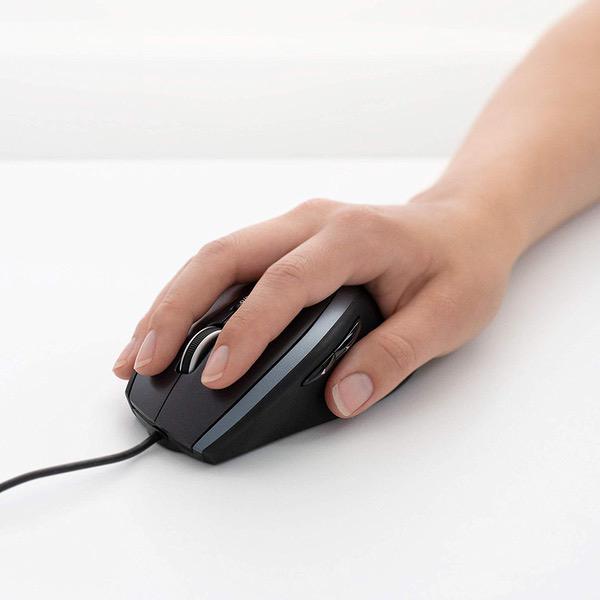
Make sure this fits by entering your model number. ERGONOMIC SHAPE - Ergonomically shaped design and soft rubber grips conform to your hand to be naturally comfortable, and the compact size makes it easy to take with you wherever you use your computer—at home, at work, or anywhere else HYPER-FAST SCROLLING - Scroll through long documents or web pages faster and easier. Or press the wheel and shift to click-to-click mode for precise navigation ZERO SETUP REQUIRED - Flexible wired connectivity means you just plug the cable into your USB or PS/2 port - it works right out of the box. CONVENIENT CONTROLS - Easy-to-reach Back/Forward buttons makes moving quickly between documents or browsing your favorite Web sites a breeze PROGRAMMABLE BUTTONS - Configure the buttons to do exactly what you want like switching applications, opening browser windows or jump to full screen while watching videos
Reviews
3.3
Reviews: 20
5 stars
25%
4 stars
20%
3 stars
30%
2 stars
10%
1 star
15%
N. Schultz
4
Solid so far and Ive used it for months, now. The control is smooth and it fits. Everything is great except: I find Im not a big fan out free-spin wheels. The optional brake works, but locks things down more than I prefer. This is a matter of taste, but worth mentioning. The driver package doesnt make assigning the extra axis as flexible as I would like. (There are configurations I would like for certain workflows, such as drafting, where assigning multiple keystrokes would be helpful. This isnt a simple matter to set up.) The negatives are quite reasonable and, for most people, quite minor. Many would not even notice them. I really like this mouse and recommend it. If it lasts more than 5yrs, its a bargain. Older Logitech mice consistently did and this one seems promising so far. (I have one PS2 Logitech mouse that survived heavy use for 15 years or so. Heavy use includes Diablo 1 & 2. Retired it when I no longer used a PS2 port, not because it broke. I hope this one lives up to that honorable legacy.)
BK
5
Ah...the elusive and rare wired mouse. This species of mouse has proven to be more difficult to track down even in its natural habitat of online electronics retailers. Once the wired mouse roamed free on mouse pads across the world but these days, they slowly are becoming extinct as the wireless mice have encroached into their territory, leaving fewer and fewer to survive in this wireless world. Ok, you may have figured out that I am fan of the classic wired mouse ( though I enjoy the wireless variety for certain uses) and this Logitech model is perfect for 90% of my needs including Photoshop, Video Editing, Music Production and regular computer stuff. Im not a big gamer so I dont need 50 buttons on my mouse with neon lighting and a cooling fan. Ok..I made up the cooling fan part. I was tired of changing batteries in my Apple Magic Mouse and this simple ...er....classic wired mouse does the trick. This model is a well made unit with scroll wheel functionality, side scroll plus two forward/ backward side buttons and its a decent size for most hands with a comfortable height for wrist support. So I am doing my part to conserve this slowly fading species...wont you help?
Brett
5
Logitech fanboy? Maybe.. I may have a soft-spot for logitech, but they have yet to disappoint me so cant blame me for it. This mouse is fantastic. I needed a more accurate mouse for UI-design, and this mouse helped out tremendously. It has an excellent weight to it, doesnt tire me out or cause fatigue, but instead helps with control. Very nice form to it (if you use mouse w/ right hand). Little button on the top switches the mouse wheel style. One way is normal, where the mouse wheel clicks with each step. Other way is loose, where you can actually spin the mouse wheel, and the way to stop it is with your finger. VERY, very useful when Im trying to sift through 10,000 lines of code. Has buttons on the side, which operate as the back/forward arrows in browsers and such. Also is a laser-mouse, so believe it or not you could use this on a glass table. It works on any surface as if there was a mouse-pad underneath it.
Marty
1
So I was excited to use this mouse. I cut the top part off to get at the mouse and the results were terrible. I cut the cord. Seriously crazy to think the cord/cable was running that high. It is totally my fault for cutting it but seriously would you pack a mouse this way? Hopefully you can learn from my mistake. Live and learn.
Jesse Frederick
3
It took me over a month to troubleshoot that the problem was with the mouse and not with my computer or USB connection. It never occurred to me that a Logitech product could be defective. When moving the mouse sometimes the cursor would just stop in place or move erratically. At first I could get it to work by slapping it against the mouse pad. Eventually that wouldnt work and I had to slap it against my thigh, and eventually it required me to knock it against something even harder like my kneecap to dislodge whatever loose wire or component was blocking the sensor. After several months, no technique could get it to continue to work for more than a few minutes. I think Ive convinced myself to buy another copy of this mouse and just pay very close attention to see if there are any irregularities within the 30 day return window. All the other mice on the market are either very poor quality or severely overpriced. Ive trusted Logitech for over 15 years, which is the only reason Im considering buying this model again. I can only assume it was damaged in shipping and perhaps if I were more mechanically inclined I could open it up and repair the problem myself.
Movie lover from HB
3
Im a casual user for gaming, but do spend about 1-2 hours a day playing a variety of games (Match 3, Solitaire, some Action/Arcade). I loved the Amazon basic mouse Ive been using, but got tired of the wire pulling it back whenever my foot caught it AND, MOST IMPORTANTLY, my hand started really cramping. So I tried an ERGONOMIC wireless mouse. Liked the freedom of movement BUT 1) the batteries made it REALLY HEAVY; and 2) the movement was sluggish and sometimes skipped, making the game playing annoying. So then I bought this mouse (M500 corded) assuming the cord would mean a lighter, quicker moving mouse. But, though I like the ergonomic feel in my hands of this mouse, it feels ALMOST AS HEAVY as my previous one. There are NO instructions so I tried just clicking on the dpi button to see if that changed anything, but all it seemed to do was make the scrolling faster but less accurate.
Desi Walch
3
This mouse feels good in my hand, glides and tracks well, and is very responsive. My only problem so far is the wheel is super sensitive and seems to spin a little too easily. I can adjust the sensitivity, but there is no resistive feedback on the mouse wheel itself. I use the mouse wheel a lot, so this is a big issue to me. Im not happy with wanting to scroll a few lines in Excel to get to the data below my screen, only to end up a few hundred rows past where I wanted. For reference, my computer setting for the mouse wheel is at a rate of 3 rows per wheel click. I like the rest of the mouse though. Eventually the wheel will gum up from use enough that it will be where I want it.
Ward
4
After trying three cordless mice with no success, I gave up and ordered this corded this model for my Mac Mini. Its a desktop computer, so the cord is really no bother. After downloading the Logitech driver software, I found that it works very well with the Mini, with one minor exception. The contours of this mouse fit my hand nicely, and my thumb falls just right on the side buttons. I really appreciate these "page back/page" forward buttons when Web surfing. This mouse tracks my movements smoothly, and the cursor does not skip around the screen suddenly (my problem with three wireless mice). All of the switches have a precise feel and provide good tactile feedback when clicks have been made. A button on top sets the scroll wheel for either smooth or "clicky" operation. The scroll wheel also has a vertical click (you put your finger tip on top and push it straight down). I have it set to bring up Mission Control, and its a fast, convenient way to switch between active programs. The scroll wheel also has switches that are activated by pushing it toward the side. I had it set to scroll the screen from side to side. However, these switches are too sensitive and randomly sent me scrolling off the side of Excel spreadsheets and other documents. I turned this feature off, and reduced my rating by one star.
B. Lewis
2
The scroll wheel is real cool. You can toggle it to be like a typical scroll wheel, or you can remove the friction and zoom down documents and web pages. Just one flip of the finger and it will continue rotating until you stop it. The buttons and the overall shape is real ergonomic too, which helps me greatly with wrist pain. The sides of the mouse are rubberized too, which feels nice when at the computer all day. The button click is not too loud either. The problem I have with the mouse is the sensor is terrible. Its constantly bugging out and will stop registering vertically. Not sure if its because the sensor is cheap, the aperture is too small, or if its just defective. Its been like this since I got it, and Ill never buy this model again, although it was really promising. I consider this a critical failure of the device, and Id recommend looking elsewhere. I just wish there was a mouse like this with all the features and a good sensor. I would buy that one instead. Logitech, are you listening? Dont bother using the software. Its practically useless and just bloats up the PC.
Robert H
3
I like the mouses size, build and ergonomics. It feels well made. However After a week I was ready to write it off as a bad purchase and go seeking a new mouse. It scrolls TERRIBLY - some finger moves nothing, others too much. I tried every adjustment and with the click button on and off. It is worst in web browsers - and yes even with the Logitech smooth scrolling add-on for that browser installed and enable. Actually it was that add-in that made me wonder - why would a mouse need a smooth scroll add-in within a web browser anyway?? As a last ditch attempt to salvage the value of my purchase (it is not a cheap mouse) I uninstalled the Logitech software that controls it. Bingo - it works like a normal mouse. The windows driver knows exactly what it is, and the Windows mouse control settings work perfectly. Perhaps the full functionality advanced features of the mouse are lost by doing so, but I did not buy it for that - and regardless, suffering through its poor basic performance would never allow me to taker advantage of the extra buttons anyway.

Showing 10 of 20 reviews

You may be interested
  • Bestsellers
  • Recently Viewed